Exit rules
Entries come from calls. Every exit is yours to configure, and they are the part of the autotrader that actually decides your result.
Your exit controls
| Control | What it does |
|---|---|
| Take profit | Closes the full remaining position at your profit target. |
| Stop loss | Closes the full remaining position at your loss limit. |
| Trailing stop | Optional. Follows the position up and closes it on a pullback from its high-water mark. |
| Sell initials | Optional. At the first price at or above x2, sells exactly 50%. |
| Manual sell | Sell any amount, any time, from the position panel. |
| Sell slippage | The tolerance your exits are allowed to accept. |
Before any of it: a stop is an instruction to try, not a guarantee of price
This is the most important paragraph on this page.
A stop-loss triggers an attempt to sell. It does not reserve liquidity, it does not guarantee inclusion in a block, and it does not guarantee a fill anywhere near your configured level.
A one-to-two-second rug can cross your stop before any transaction can land. On these tokens that is not an edge case — it is a routine event. Your realised loss can be substantially worse than the level you set, up to and including the entire position.
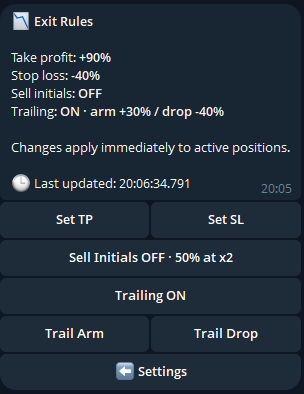
Sell initials
When enabled, the first observed price at or above x2 submits one exact 50% sell. The confirmed remainder stays open under your take-profit, stop-loss, trailing and slippage settings.
It can fire once per position.
Selling initials does not eliminate risk. It converts an open position into a smaller open position.
What happens if the bot restarts mid-partial
The partial signature, quantity, proceeds and allocated PnL are all recorded durably, so a restart can finalise the partial sell without closing the rest of the position. Your final position PnL combines the partial and final proceeds.
Manual selling
From the position panel:
| Action | Confirmation |
|---|---|
| Sell All | Queues immediately |
| Recover Initial | Queues immediately |
| Sell Profit | Queues immediately |
| Preset percentages | Queue immediately |
| Custom percentage | Asks you to confirm |
Preset actions skip a second confirmation because in a fast market the dialog itself is a cost, not a safety feature. A custom percentage still asks, because a mistyped number there is a different kind of error.
Manual sells are never rate-limited. Other sensitive wallet actions are. Behind every one of them the executor still runs its full sequence — position claim, confirmed balance check, exact attributed inventory, slippage, simulation and reconciliation.
How exit thresholds are calculated
Thresholds are measured against your confirmed trade cost — the exact SOL input, the platform buy fee and the entry network fee — not against the price printed on the Telegram call. One-time token-account setup rent is tracked separately, because it is recoverable and folding it in could push a position into a false stop-loss the moment it opened.
The price a signal fired at and the price you filled at are not always the same, so each trigger uses the conservative side: take profit, trailing profit and initials require the higher of the two bases, stop loss requires a loss against the lower. A disagreement between the feed and your fill can therefore never fabricate a profit exit or a loss exit — both have to be real. The position panel shows target distances on the same basis the worker uses.
Exits run on live on-chain prices
Exit monitoring watches the latest on-chain swap price, not the Telegram milestone lifecycle. Your exits keep working after the 24-hour call-tracking window ends. Your position is not on that clock.
What happens when a token changes venue
If a token moves from the bonding curve to the AMM pool while you hold it, the executor verifies the canonical pool and routes the sell there rather than failing against a venue that no longer exists.
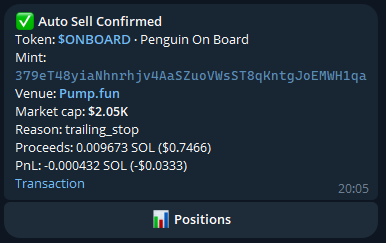
trailing_stop — along with
proceeds, realised PnL and a link to the transaction on chain. This one closed at a
small loss, which is an ordinary outcome.Changing your rules affects open positions
Changing take profit, stop loss, trailing stop or sell slippage updates every one of your unresolved positions atomically, and records the change on that position's history.
Entry-side values do not change. Entry size, entry mode, buy slippage, membership tier, platform fee and entry economics stay frozen as they were at entry, so your effective exit policy stays auditable against what you configured at the time.
What a stop-loss cannot do
The warning at the top of this page is the whole of it. Alongside it:
- Marked value is an estimate, not an executable quote. It excludes your own sell impact, network fees and fast-market slippage.
- Liquidity can vanish. There is no exit price if there is nothing on the other side.
- Failed exits are retried carefully, not infinitely. The bot never widens your slippage to force a fill.
What happens after a failed automatic exit
An automatic sell confirmed failed on chain for a recoverable reason is rebuilt once from fresh pool state. It never retries an unknown or pending signature, and a second failure returns to normal reconciliation.
Disabling Auto
Turning Auto off blocks new entries only. Every open position continues to be monitored, and every exit rule stays active. There is no state in which the bot stops managing money it already holds.