Positions
/positions is where you watch and manage everything you hold.
The dashboard
The first screen is a one-page overview of unresolved positions only — closed positions are not shown here.
Each row gives you the ticker, the market cap your buy actually filled at, the
current market cap, and the percentage change between them. Tap a ticker to open that
exact position; the equivalent /position_<mint> command also works if you prefer
typing.
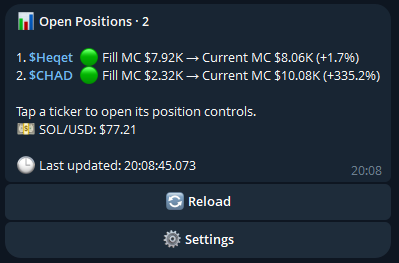
/positions overview. Two past example positions —
not indicative of typical results.Every execution notification the bot sends carries a 📊 Positions button, so you can go straight from a fill confirmation to the live panel. Doing so leaves the confirmation message and its transaction link intact as your execution record.
The position panel
The individual view is a compact trading panel:
| Section | Contents |
|---|---|
| Identity | Token, venue, links |
| Market | Latest indexed price and market cap |
| Your position | Wallet balance, cost basis, marked gross value and PnL |
| Progress | High-water multiple, distance to your active targets |
| Controls | Active TP / SL / trailing / slippage, confirmed full-sell action |
Buys stay call-triggered — the panel deliberately does not introduce an unrelated manual-buy path.
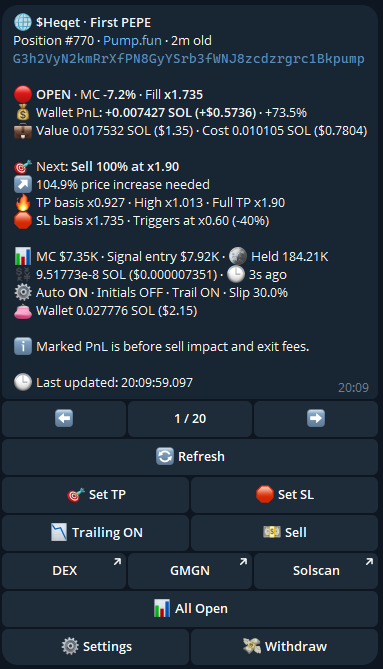
The two performance numbers
The panel shows two different measures, and confusing them is the most common source of "why don't these match?".
The primary percentage.
Current executable market cap versus the market cap recorded when the entry signal qualified.
This tells you how the call has performed. It is the number comparable to the milestones you see in the channel.
Your actual SOL result.
Built from confirmed acquired quantity, actual entry cost, any partial or external proceeds, and current marked value.
This tells you how you have performed — including your fees, your fill and anything you sold along the way.
They differ because the call's performance and your performance are genuinely different things. You did not fill at the signal price, and you paid costs the signal did not.
They can even point opposite ways
In the panel above, the same position reads MC −7.2% and Wallet PnL +73.5% at the same moment.
The call is below the market cap it qualified at, so by the signal measure it is
down. But that buy filled well under the signal price — the panel shows
Fill x1.735 — so the wallet is up regardless.
Neither number is wrong. If you only ever read one, read Wallet PnL: that is the one denominated in your own money.
Signal mcap vs Entry mcap
Buy confirmations label the pre-execution value Signal mcap, not
Entry mcap — because it is the market cap the signal qualified at, not
necessarily the one you filled at.
For the position list, fill-derived market cap is used: the signal market cap scaled by your confirmed execution price against the signal reference price. It falls back to the signal market cap only when no confirmed fill price exists.
Marked value is an estimate
Marked value and unrealised PnL are labelled as estimates throughout, and that labelling is honest rather than defensive. They are derived from the latest indexed executable price. They are not an executable quote, and they exclude:
- your own sell impact on the pool
- the network fee to exit
- fast-market slippage
What you actually receive on exit will differ, and on a thin token it can differ a lot.
SOL and USD
SOL is the canonical execution and accounting unit. Every balance, size, cost, value, proceeds and PnL figure also displays its USD equivalent, converted from a timestamped reference price.
The conversion is presentation only. It never affects trade sizing or your persisted SOL PnL.
Positions the bot closes for you
Beyond your own exit rules, a position can close because reality moved:
- External inventory reduction — you (or another program using your key) sold or moved all of the bot-attributed tokens. The bot closes the position, notifies you, matches the exact quantities to the external transaction signature, and values the proceeds from what actually landed in the wallet. See Your wallet.
- Partial external sells are reconciled rather than closing the position — cost basis and realised PnL are preserved on the remainder.
Native SOL and WSOL proceeds are valued directly; USDC and USDT use the timestamped SOL/USD reference. Unknown output assets are left explicitly unvalued rather than being given an invented PnL.
Verification
Confirmed buys, partial sells, normal exits and recognised external exits are re-checked against Solana transaction metadata — comparing exact wallet and token deltas, network fees, and the atomic platform-fee transfer.
The stored audit keeps normalised amounts and mismatch codes, not raw transaction metadata. The point is that the numbers in your panel are periodically reconciled against the chain, rather than trusted because the bot wrote them down.