Getting started
Setting up takes about five minutes. Nothing trades until the last step.
1. Join the channel
Free access requires the channel — that is where the calls are posted, and membership in it is the whole entry requirement. Premium members need not even that: a paid membership is access on its own.
The group is where members talk. Joining it is optional and worth it, but nothing is gated on it.
Join the channel → Chat with members →
2. Open the bot
Start a private chat with the bot and send /start. Everything below happens in
that private chat — never in the channel.
| Command | What it opens |
|---|---|
/start |
The home menu — Premium, referrals, autotrader, help |
/settings |
Trade setup, exit rules, execution & fees, wallet |
/positions |
Your open positions dashboard |
/premium |
Plans and your current membership |
/referral |
Your referral link and stats |
/withdraw |
Withdraw SOL to your own address |
/importwallet |
Import an existing Solana wallet |
/help |
The command list |
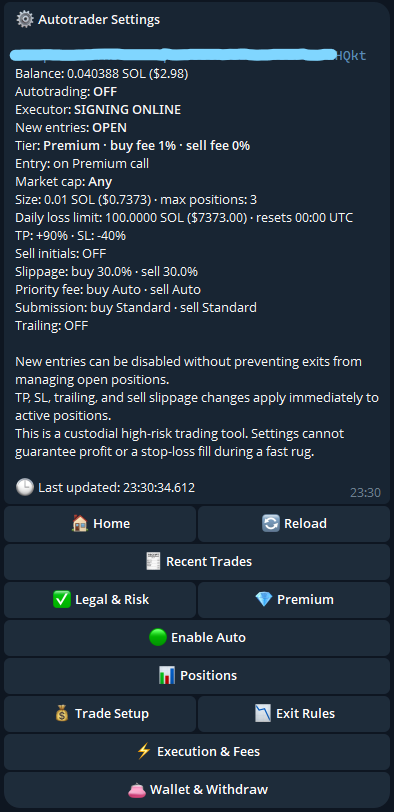
/settings menu. Everything above the buttons is
your current configuration at a glance; the four submenus at the bottom hold the
detail. Wallet address redacted.One menu, always at the bottom
The bot keeps a single canonical menu message. Sending any of these commands sends a fresh menu at the bottom of the chat and retires the old one, so you are never scrolling up hunting for live buttons. Buttons edit that message in place.
3. Accept Legal & Risk
Before you can create a wallet or enable Auto, you must accept the current Legal & Risk disclosure. The exact text you accepted is recorded by its hash — if the disclosure changes materially, you will be asked to accept the new version.
This gate only ever blocks new activity. It can never prevent you from disabling Auto, exiting a position, withdrawing, exporting your key, or deleting your wallet. Legal gating is not allowed to trap your exposure.
4. Create or import a wallet
You have two options in /settings:
The bot generates a fresh Solana keypair and stores it encrypted. Nothing sensitive ever travels through Telegram.
This is the safer path. Fund it with only what you intend to trade.
/importwallet accepts a base58-encoded 64-byte private key through a
confirmed, encrypted, expiring flow, and deletes your Telegram message
immediately afterwards.
Telegram is not a secure transport for private keys. Deletion is best-effort. Do not import a wallet holding meaningful value.
See Your wallet for custody, export, withdrawal and deletion details.
5. Fund it
Send SOL to your bot wallet address, shown in /settings.
Your balance has to cover more than just the buy:
buy size
+ platform fee            (1% Premium / 3% Free)
+ network + priority fee
+ token-account setup buffer
+ enough left over to pay for the sell
Nothing is held back for you: there is no minimum balance and no protected reserve. That last line is the one to take seriously anyway — an exit is a transaction and costs a network fee, so a wallet spent to zero cannot sell what it holds until you top it up. See Keeping SOL for your exits.
The bot sends you one proactive warning if your balance drops below what the next buy actually needs, showing your balance, the requirement and the shortfall. It re-arms once you top up, rather than nagging on every check.
6. Configure before enabling
Do this before turning Auto on, not after.
- Buy size — starts at 0.01 SOL. Range is 0.001 to 10 SOL.
- Entry mode — instant, or at a milestone multiple.
- Market-cap filter — optional USD range, e.g.
5k-15k. Defaults toany. - Take profit / stop loss / trailing stop
- Sell initials at x2 — optional 50% de-risk.
- Slippage for buys and sells.
- Daily loss limit — realised loss cap, resets 00:00 UTC.
- Execution route — Standard or Lightspeed.
Full detail in Trade setup and Exit rules.
7. Turn Auto on
/settings → Auto.
Until you do this, nothing buys. After you do, the next qualifying call that passes your filters and limits will be entered.
Turning Auto off later
Disabling Auto blocks new entries only. Every open position keeps being monitored and exited under your rules. It is a pause on buying, not an abandonment of what you hold.
Start small
Run it at the default 0.01 SOL for a while first. Watch how entries and exits behave on real calls, read a few position panels, and confirm the exits do what you expected before you size up. There is no automatic scale-up, so sizing up is always a deliberate decision you make with evidence in front of you.