Trade setup
Everything on this page lives in /settings and applies to new entries. Changing
any of it never forces an exit from something you already hold.
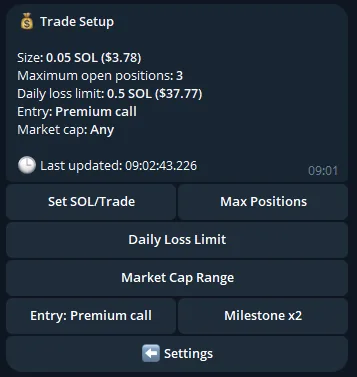
Buy size
| Range | 0.001 – 10 SOL |
| Default | 0.01 SOL |
This is the SOL that goes into the trade itself. Fees and network costs sit on top — see Fees and costs.
A larger configured size is not a shortcut past anything. Every buy, at every size, still has to clear the same wallet-balance, fee, setup-buffer, position limit, daily-loss, fleet-capacity, simulation and pre-submission checks.
Entry mode
Enter as soon as the call you're entitled to arrives.
- Premium → enters from the confirmed initial Premium call
- Free → enters from the public x2 crossing that creates the Free call
/settings shows your effective policy as on Premium call or at public x2,
so there is never any doubt which one you are on.
There is no artificial Free delay
Free is not held back by a timer. The boundary is the x2 event itself — the same observable market event that creates the Free call.
Enter when a call reaches a multiplier you choose.
Set an integer multiple and the bot enters on a fresh crossing of it. It cannot reuse a crossing that happened while you had no capacity — a milestone entry requires a genuinely current crossing, not a stale one it missed.
Whichever applies, the mode used is frozen onto each position so you can always tell why a given entry happened.
Market-cap filter
An optional inclusive USD range on the call's market cap at entry.
How it behaves:
- Checked twice — when scheduling the entry, and again immediately before the transaction is built and submitted.
- Fails closed. If market-cap evidence is missing, a configured range rejects the entry rather than guessing.
- The value at entry and your configured bounds are frozen onto the position, so you can see afterwards exactly what it was measured against.
- Skips caused by your range are recorded separately from genuine incidents — a call outside your band is an expected skip, not an error.
- Changing the range affects new or not-yet-submitted buys only. It never forces an exit from a position you already hold.
Funded-holder screening
There used to be a per-user "funded holders only" toggle here. It is gone, because it stopped selecting anything.
The funded check was promoted into the call path itself: a candidate whose top holders are not funded, real wallets — a median balance of at least 10 SOL across the sampled top holders, measured at call time — is not called at all. Every call you can enter has already passed it, so a filter applied on top of that could not change which calls you entered.
Measured over 20 tracked days, before promotion:
| fast-rug rate | reached x2 | |
|---|---|---|
| funded ✅ calls | ~11% | ~38% |
| funded ❌ calls | ~22% | ~33% |
That is the separation the check buys, and it now applies to everyone on every call rather than to whoever found the setting. It fails closed — a candidate with no funded verdict is rejected rather than assumed funded.
It improves the odds, it does not remove the risk
This is a historical observation over one measured period, not a promise. Tokens that pass the funded check still rug.
Slippage
Buy and sell slippage are configured separately. Sell slippage is an active risk control — see Exit rules.
Priority fee
| Setting | Behaviour |
|---|---|
| Auto (default) | Uses a low automatic fee. Recommended. |
| Explicit | You set a maximum, capped at 5% of the trade size and 0.005 SOL — whichever is lower. |
Auto genuinely means automatic. It is never silently converted into the maximum
ceiling.
The service reads the built transaction's exact fee — not an estimate — before signing, and re-checks your balance against it.
Execution route
| Route | Cost | Behaviour |
|---|---|---|
| Standard (default) | — | Normal RPC submission. |
| Lightspeed | 0.001 SOL tip per transaction | Priority submission via Solana Vibe Station. |
Both default to Standard, and buys and sells are selected independently.
The Lightspeed tip applies to every selected transaction — including each partial sell. A position that enters, sells initials, and then closes on Lightspeed pays the tip three times.
If Lightspeed rejects the submission, it immediately falls back to Standard using the identical signed bytes and the same signature — so the fallback cannot produce a second, different transaction. Your confirmation message tells you when the fallback was used. Entry tips are included in the balance and cost checks up front.
Your limits
Max open positions
A per-user cap on simultaneously open positions, enforced against remaining slots — including when several calls qualify in the same moment.
Daily loss limit
A realised loss cap, default 100 SOL, reset at 00:00 UTC.
Realised loss is attributed by sell leg — initials, manual partials, external partials and final exits each count on the UTC day they actually land. It does not double-count cumulative closed-position PnL.
If same-day external-exit economics are still unresolved, new entries fail closed rather than counting the unknown as zero.
Signal freshness
A call signal has a short validity window — about 10 seconds — and freshness is checked twice: when the entry is scheduled, and again immediately before submission.
Why a stale signal is skipped rather than chased
If a signal has gone stale by the time a buy could actually land, the entry is skipped and recorded, not chased. Delayed delivery, catch-up processing or a slow quote all fail closed without sending a buy.
This is intentional. Entering a 15-second-old signal at whatever price now exists is a different trade from the one you configured, and the bot will not silently make it on your behalf.